Samsung Dishwasher Not Filling With Water: Causes and Safe Fixes
Quick answer
If your Samsung dishwasher is not filling with water, start with the simple things. Samsung says a dishwasher first drains for about 35 seconds before it fills, so a short wait is normal. If it still does not fill, the most common causes on Samsung’s support pages are a door that is not fully latched, Child Lock or Delay Start being on, a water supply valve that is not fully open, a kinked supply hose, or water pressure or temperature outside Samsung’s requirements. If the display shows 4C or 4E, Samsung calls it a water supply error. If the water supply is fine and the problem continues, the water inlet valve may need service.
Quick diagnosis table
| Symptom | Possible cause | First check |
|---|---|---|
| Hums at the start but no water yet | Normal drain step before filling | Wait about 35 seconds |
| Will not fill, no error code | Door not closed, or Child Lock or Delay Start is on | Close the door and turn off Child Lock or Delay Start |
| Blinking 1 on the display | Cycle was canceled by holding Start | Press Start to resume |
| 4C or 4E on the display | Water supply error | Open the supply valve and check the hose |
| 9E on the display | Low water level | Empty the dishwasher and run a Normal cycle |
| Still will not fill after these checks | Possible water inlet valve failure | Get a professional diagnosis |
Safety first
- Cut the power before any hands-on check. Switch off the dishwasher’s circuit breaker before you look under or behind the dishwasher.
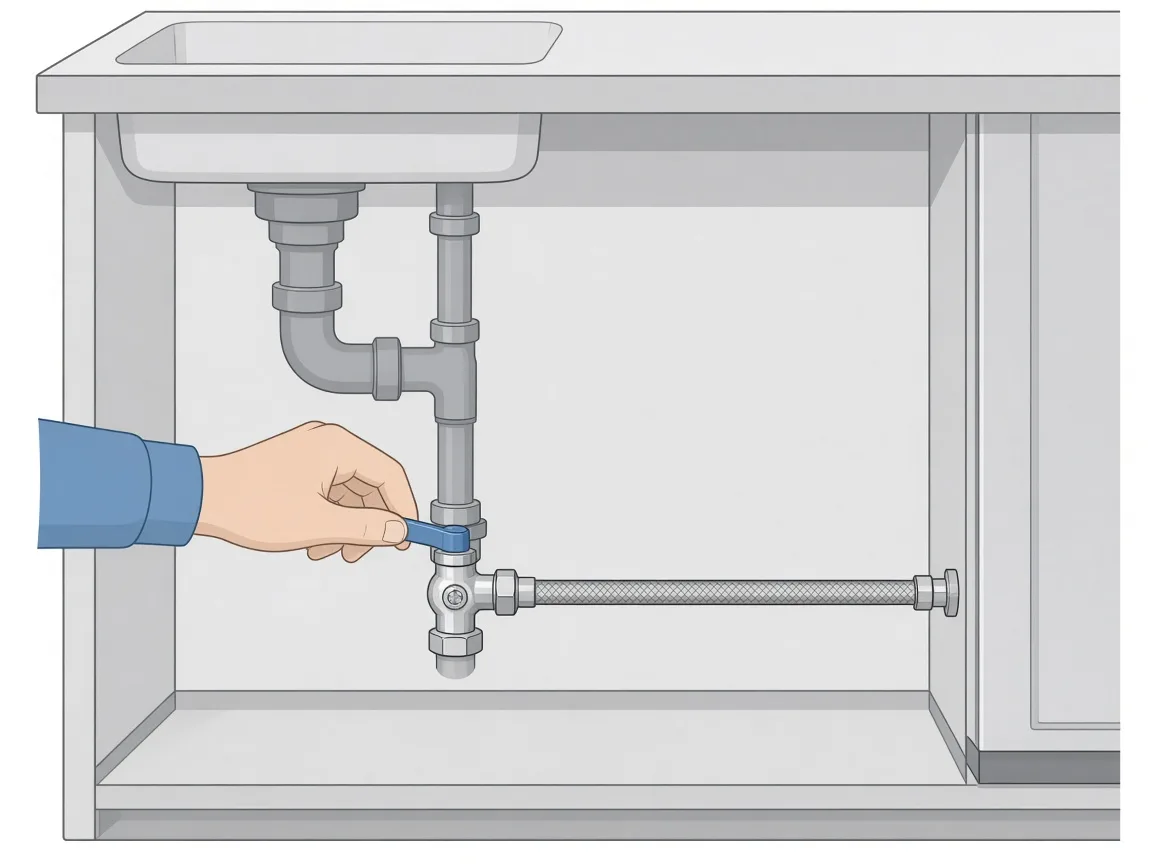
- Shut off the water before touching any connection. Close the dishwasher’s supply valve, usually under the kitchen sink, before you inspect or loosen a hose.
- Watch the water temperature. Samsung warns that the supply water should not exceed 149°F to avoid severe burns.
- Do not pull a connected dishwasher out of the cabinet. This can kink or damage the water line and drain hose.
Read our full Safety Disclaimer before you start.
How to confirm the problem
- No code, no water: the dishwasher hums or makes pump noise at the start, but no water comes in. Samsung notes this can be the normal drain step at the start of a cycle, which takes about 35 seconds.
- 4C or 4E: Samsung’s error code list calls this a water supply error. The dishwasher is not getting water at the pressure or temperature it needs.
- 9E: Samsung lists this as a low water level error. There is not enough water in the dishwasher.
- Blinking lights: some Samsung models without a digital display show errors with blinking lights instead of a code. Check your user manual or Samsung’s blinking lights guide.
Samsung advises not to reset or clear an error code before you troubleshoot it, because the cause will not be fixed and the error may return. Write down your full model number first. See How to Find Your Model Number.
Safe checks when it will not fill (no error code)
- Wait for the drain step. Start a cycle and wait. Samsung says the dishwasher first drains leftover water, which takes about 35 seconds, and then starts filling.
- Close the door fully. The dishwasher will not start if it does not detect that the door is closed.
- Turn off Child Lock. If the buttons do not respond, Child Lock may be on. It is usually shown by a padlock icon and toggled by pressing and holding the designated button (often Heated Dry, Sanitize, or Child Lock) for 3 seconds.
- Turn off Delay Start. If Delay Start is set, the dishwasher waits until the set time before starting.
- Press Start, do not hold it. Samsung says holding Start for more than 3 seconds cancels the cycle and drains the dishwasher. A blinking 1 on the display means this happened; press Start to resume.
- Reset the breaker. Turn off the dishwasher’s circuit breaker, wait 30 seconds, restore power, and try another cycle.
Safe checks for 4C or 4E (water supply)
- Open the supply valve fully. Check the shut-off valve that feeds the dishwasher, usually under the sink, and make sure it is fully open.
- Check the supply line for kinks. Look along the visible part of the water supply line under the sink. Straighten any bend or twist. Samsung recommends a stainless steel supply line for durability and notes that supply line issues can cause error codes or blinking lights.
- Check the hot water temperature. Samsung says the hot water supply should be between 120°F and 149°F for best cleaning and drying, and that temperature problems can cause error codes or blinking lights.
- Check the water pressure. Samsung requires 20 to 120 psi. Below 20 psi, the water supply valve may not work or shut off properly. If other faucets in your home also have low pressure, the issue may be your plumbing rather than the dishwasher.
- Consider the inlet filter. Samsung’s UK support page lists a filter on the water supply valve clogged by debris as a cause of 4C/4E, and its fix is to clean that filter. Reaching it means shutting off water and power and disconnecting the supply line at the dishwasher. If you are not comfortable doing that, stop here and call a technician.
Safe checks for 9E (low water level)
- Empty the dishwasher.
- Add detergent and run a Normal cycle.
- If 9E comes back, Samsung says to switch off power to the dishwasher at the circuit breaker and request service.
Still not filling?
If the water is on, the supply line is straight, pressure and temperature are within range, and the dishwasher still does not fill, Samsung’s support pages point to service. Samsung’s UK page lists a defective water supply valve and a control board failure as causes of 4C/4E that need a service technician. Stop here if you see water leaking, smell burning, or the breaker trips.
Need a pro? If any step feels unsafe or the problem keeps coming back, see when to call an appliance technician and how to prepare for the visit.
Likely replacement part: water inlet valve
When the water supply checks out but the dishwasher still will not fill, the next part to suspect is the water inlet valve, which opens to let water into the tub. Samsung uses different valves on different models, so match the part to your exact model number before you buy.
Find the right part by your model number: check the water inlet valve on AppliancePartsPros and confirm it fits your exact model before you order. Not sure where the model number is? See How to Find Your Model Number.
Example: Samsung genuine dishwasher water valve, part number DD62-00084A, was listed at $85.78 on AppliancePartsPros.com when we checked on November 20, 2026. AppliancePartsPros lists “will not fill with water” among the symptoms this part fixes. Prices change; the retailer’s page shows the current price and whether it fits your model.
Replacing the inlet valve means working under the dishwasher with water and power connections. If you have not done this before, have a technician install it.
Related problems
- Dishwasher Not Draining: a general guide for all brands.
- How to Find Your Model Number: needed before ordering any part.
FAQ
Why does my Samsung dishwasher hum but not fill with water?
At the start of a cycle, Samsung dishwashers drain leftover water for about 35 seconds, so you hear the pump before any water comes in. If water still does not enter after that, check the door latch, Child Lock, Delay Start, and the water supply valve.
What does 4C or 4E mean on a Samsung dishwasher?
Samsung calls 4C/4E a water supply error: the dishwasher is not getting water at the pressure or temperature it needs.
What water pressure and temperature does a Samsung dishwasher need?
Samsung’s requirements are 20 to 120 psi of water pressure and a hot water supply of 120°F to 149°F.
Should I reset the dishwasher to clear the code?
Not first. Samsung advises troubleshooting before resetting, because clearing the code does not fix the cause. After the checks, resetting the breaker for 30 seconds is a step Samsung recommends.
When should I call a technician?
Call one if the water supply is confirmed good but the dishwasher still will not fill, if 9E keeps returning, or if you would need to remove panels to reach the inlet valve.
Need a hand?
A technician can test the inlet valve and controls and replace the right part for your model.
Need a pro? If any step feels unsafe or the problem keeps coming back, see when to call an appliance technician and how to prepare for the visit.
Disclosure: some links in this article are affiliate links. If you buy a part or book a service through them, we may earn a commission at no extra cost to you. Learn more.
Sources
- Samsung (U.S.), Samsung dishwasher does not start or fill with water: https://www.samsung.com/us/support/troubleshoot/TSG10013655/
- Samsung (U.S.), Samsung dishwasher is displaying an error code (4C/4E, 9E): https://www.samsung.com/us/support/troubleshoot/TSG10004499/
- Samsung (U.S.), Samsung dishwasher water supply requirements: https://www.samsung.com/us/support/answer/ANS10004782/
- Samsung (UK), 5C/5E, 4C/4E, and LC/LE information codes on my dishwasher: https://www.samsung.com/uk/support/home-appliances/5c-5e-4c-4e-and-lc-le-information-codes-on-my-dishwasher/
- AppliancePartsPros, Samsung DD62-00084A Dishwasher Water Valve (price checked November 20, 2026): https://www.appliancepartspros.com/samsung-valve-water-dd62-00084a-ap5178218.html